If you’re tired of manually turning lights or appliances on and off, a smart plug could be just what you need. These Wi-Fi-enabled devices let you control any connected gadget remotely, whether through your phone, voice commands, or automating schedules.
They’re simple to set up and can help you save energy and boost home security. Keep reading to find out what a smart plug can do for you.
What Does a Smart Plug Actually Do?
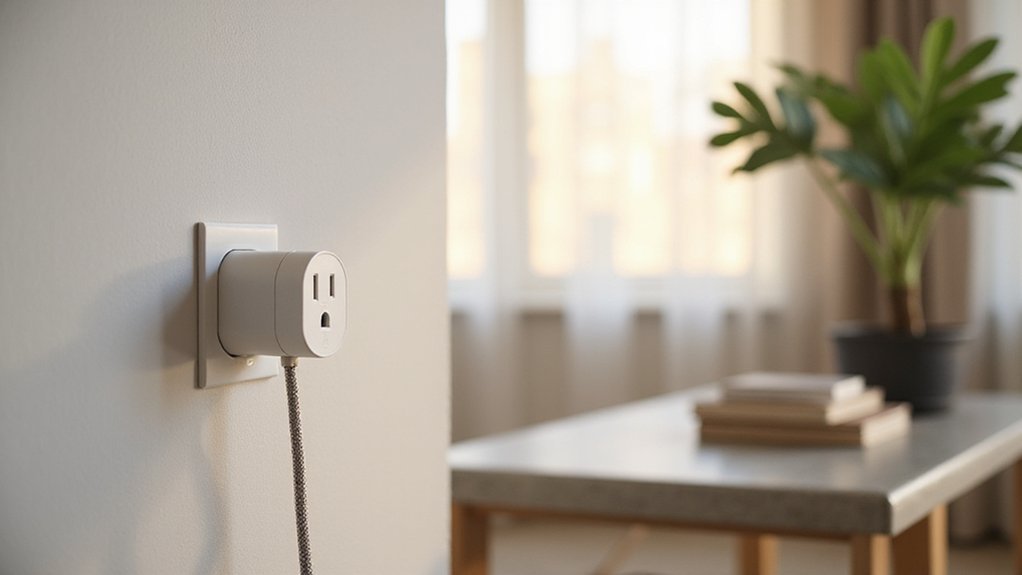
A smart plug functions as a remote power switch for your appliances. By inserting it between your wall outlet and device’s cord, you can control the device’s power status from your phone’s app, a smart home hub, or through voice commands with Alexa or Google Home. This setup enables you to turn devices on or off from anywhere, eliminating the need to physically reach behind furniture or switch them manually.
Beyond simple remote control, smart plugs help reduce standby power consumption—that little trickle of energy drawn when appliances are turned off but still plugged in. You can schedule lights or appliances to turn on or off at specific times, creating the illusion that someone is at home. This feature can enhance your home’s security when you’re away, deterring potential intruders. Many households also benefit from using smart plugs to automate seasonal lighting schedules. For those concerned about noise levels in their living space, using a smart plug to control a ceiling fan can help you schedule it to run only when needed, which reduces the chance of noticing unwanted humming from the motor.
Because of their connectivity features, security is a concern. Reputable models use strong encryption to protect your data, and a trusted app ensures your privacy is maintained. It’s important to remember that smart plugs mostly act as reliable remote switches—they do not add complex intelligence or automation capabilities to your appliances but provide simple, convenient control over your devices. For those considering a similar installation project, following safe wiring tips can ensure a clean and secure DIY finish.
Why You’d Want a Smart Plug (and What It Won’t Do)
A smart plug can only switch power on or off; it cannot control complex devices or change their settings. While it offers remote control, energy savings, security features like simulation mode, and safety functions such as remote shutoff, it is not a complete automation solution. For example, it won’t manage adjustable thermostats, smart appliances with multiple modes, or devices requiring ongoing interactions beyond simple power toggling. Unlike a ceiling fan with light, which requires properly wiring both power and control circuits for safe operation, a smart plug simply interrupts the existing power line. Similarly, sealing recessed can lights prevents air leaks and ensures a clean finish, but a smart plug cannot address such installation details. Additionally, many smart plugs connect to Wi-Fi and report data to the cloud, raising potential privacy concerns. If privacy is a priority for you, review the manufacturer’s data policy before purchasing. Remember, a smart plug is a useful tool for specific tasks, but it cannot handle every automated need in your home.
Smart Plug Features: What to Look for When Buying
To choose the right smart plug, focus on several key features. First, verify its integration options—ensure it supports your smart home ecosystem, whether that’s Apple HomeKit, Google Home, or Amazon Alexa. Compatibility varies, so don’t assume all plugs work with your voice assistant; check before purchasing. For those who also enjoy aesthetic lighting, a wall sconce candle holder can complement your smart plug setup by adding ambiance.
Design considerations are also important. Look for a compact, slim model that doesn’t block neighboring outlets. Having a manual power button offers direct control without needing to open an app, and a customizable or disable-able status LED can reduce light disturbance in bedrooms. Also, be aware that some models with large or protruding shapes may not fit in tight spaces or leave room for adjacent plugs.
Match the plug’s amperage and wattage ratings—with 15A and 1800W being common—to the appliances you plan to use. Safety certifications like UL approval provide peace of mind. If automation features interest you, confirm the plug supports scheduling and routines. Energy monitoring functions are optional but can help you track and manage power usage effectively.
Smart Plug Setup: How to Do It in Under 5 Minutes
To set up a smart plug in under 5 minutes, follow these steps. First, download the companion app for your device and create an account. Plug the smart plug directly into an outlet, avoiding power strips to ensure a stable connection. Make sure the indicator light on the plug is blinking; this shows it’s in pairing mode. If it’s not blinking, press and hold the power button for 5 to 10 seconds until it starts. You should also create a home profile in the app to utilize features like location-based automation. For optimal performance, position the plug away from any metal fixtures that could interfere with its wireless signal. Before fitting the new unit, it is important to check the wiring and ensure the power is turned off at the breaker.
Next, connect your smartphone to a 2.4 GHz Wi-Fi network, as most smart plugs do not support 5 GHz. Open the app and enter your Wi-Fi network name and password. If prompted, switch your phone temporarily to the plug’s network to facilitate the connection. The app should detect the plug automatically and establish a connection. Once connected, you can rename the device for easier identification. When choosing between brands, consider that Tapo plugs generally offer lower running costs compared to similar Kasa models.
After setup, you can control your device with voice commands using Alexa or Google Assistant. If your smart plug model supports energy monitoring, you will also be able to track power consumption. When the indicator light turns steady, setup is complete. Now, simply plug in your appliance and control it remotely or via voice commands.
What Can You Actually Use a Smart Plug For?
Smart plugs are highly versatile, allowing you to automate, monitor, and control your devices from anywhere. By connecting household appliances like lamps or fans to your smart home system, you can operate them through voice commands using Alexa or Google Assistant, eliminating the need to physically flip switches.
You can schedule a slow cooker to turn on before you arrive home, ensuring a hot meal awaits you, or program holiday lights to match your daily routine for a festive, automated display. Energy monitoring features help you identify devices that consume unnecessary power, allowing you to reduce phantom loads and save on electricity costs. For added security, set timers to turn lights on and off to mimic occupancy when you’re away. When traveling, you can also remotely disable garage door openers or other electronics. Overall, smart plugs transform ordinary electronics into responsive, efficient components of your connected lifestyle. For a clean and secure setup, follow safe wiring tips to ensure your installation is both functional and aesthetically pleasing. If you’re using smart plugs to control recessed lighting, ensure the fixtures are rated for wet or damp locations to prevent moisture damage and maintain safety.
Smart Plug Problems: What Goes Wrong and How to Fix It
Connectivity failures are the most common issue with smart plugs. Renamed Wi-Fi networks, weak signals, or router settings can cause the device to go offline. To fix this, try rebooting your router and unplugging the smart plug. Moving the plug closer to the router can improve the signal strength. Assigning a static IP address may also help stabilize the connection and prevent disconnections. For rooms with specific lighting needs, consider using LED strip lights for consistent, reliable illumination. When choosing a fan for your bedroom, ceiling fan color can also affect the overall ambiance and perceived brightness of the room. Ensuring your home’s wiring setup is properly grounded can also prevent electrical interference that disrupts smart plug performance.
Firmware bugs can lead to automation failures, such as schedules not activating even when manual control works fine. To address this, update both your smart plug’s firmware and the associated app to the latest versions. After updating, re-create any routines or schedules that previously failed.
User permissions within the app can also prevent control of the smart plug. Double-check the app settings to ensure you have the necessary permissions and that no restrictions are in place. If problems persist, test the physical button on the device. If manual control works, the issue is likely software or connectivity related. Persistent issues may require performing a factory reset on the plug and re-pairing it with your setup. These steps resolve most common smart plug malfunctions.
Check Compatibility, Wattage, and Price Before Buying
Ensure compatibility, wattage, and price before buying a smart plug. First, check regional compatibility. A North American 120V plug won’t work on a UK 240V outlet, so match the voltage and outlet type to your country’s standards. Next, verify the power rating; most smart plugs support 15 amps, but you cannot safely use them with high-draw appliances like space heaters or portable air conditioners. Always compare the nameplate wattage to the plug’s continuous wattage limit to avoid overloads. For ceiling fans, a common cause of remote failure is a tripped circuit breaker in the same electrical path. If you later need to reconnect the plug after a power outage, following a factory reset process can resolve most pairing failures. Finally, consider the price. Basic Wi-Fi smart plugs typically cost under $15, while models supporting standards like Matter or Zigbee tend to be more expensive. Avoid overspending on features you do not need and confirm that the plug is compatible with your smart home platform such as Alexa or Google Home. Doing this quick check saves potential headaches later. For a clean DIY finish, follow similar wiring safety tips as with under cabinet lighting installations.
Is a Smart Plug Different From a Smart Outlet?
A smart plug is an external device that you plug into an existing wall outlet, turning any plugged-in device into a smart device controllable via an app. It’s portable and straightforward to use—just insert it, connect to your Wi-Fi, and you’re ready to control your device remotely. This makes smart plugs ideal for temporary setups, rental situations, or if you want a quick and easy way to automate specific appliances without altering your home’s wiring.
A smart outlet, on the other hand, replaces the built-in wall receptacle. It requires replacing your existing outlet, which typically involves dealing with wiring—most likely with the help of an electrician. Smart outlets sit flush with the wall for a cleaner look and don’t block adjacent sockets, making them better for permanent, seamless integration into your home’s design. They provide more consistent integration for your entire space but involve more effort and cost upfront. If you prefer a neat, long-term installation and are comfortable with wiring work, a smart outlet is the better choice. If simplicity, portability, or temporary control are your priorities, a smart plug is the more practical option.